Voice first · One connected app

Your voice.
Your day.

Say the event. Speak the list. Capture the thought. 8Rings puts your voice at the heart of your day — from spoken commands to quick check-ins, all in one app.

Now on the App Store for iPhone.
Download 8Rings

Speak naturally. Keep life moving.
iPhone Apple Watch companion
From your voice to your day

Say it now.
See it today.

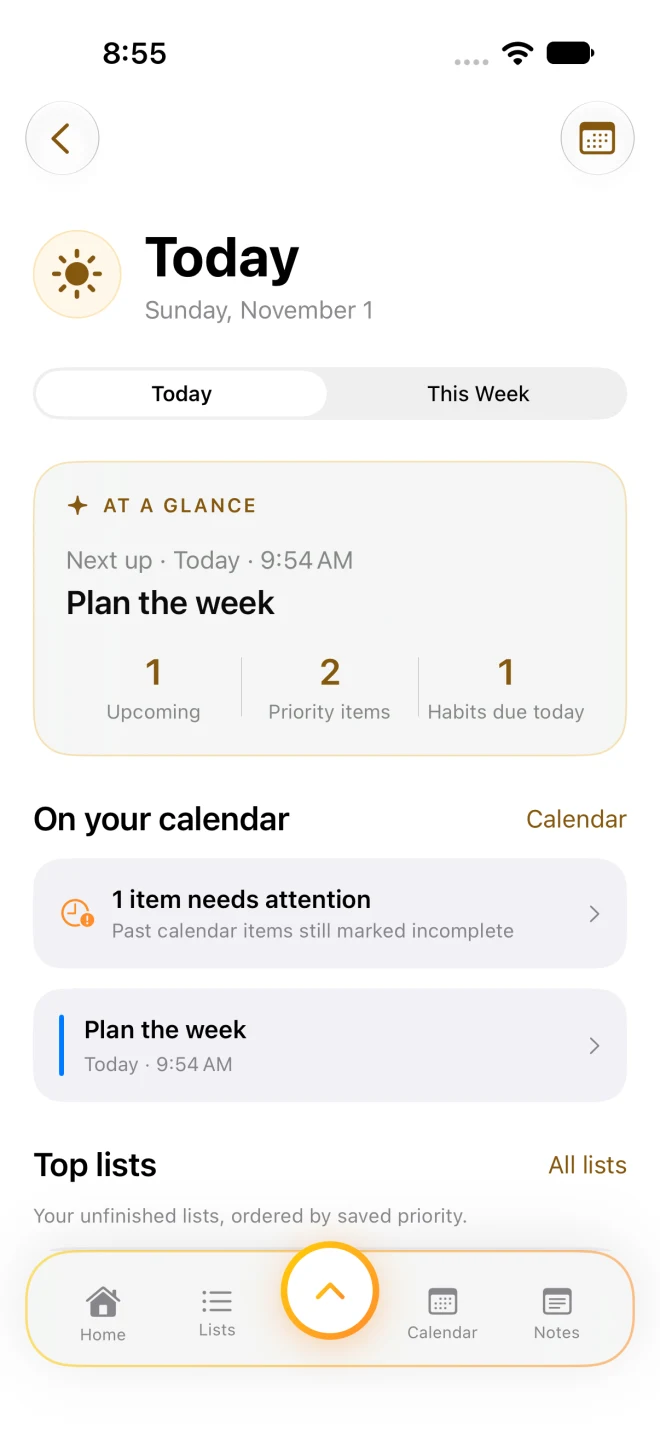
The events and tasks you capture by voice come together in Today. See what needs attention, then open a weight check-in or start a spoken journal note.

  • Your spoken plans, in view.

    See upcoming events and reminders that need attention. Clear an alert or mark an event complete from Today.

  • Your to-dos, ready for you.

    The tasks you spoke into Lists appear by saved priority, alongside the habits due today.

  • Make a moment to speak.

    Open the journal prompt to record a thought in Notes, or check in with Pounds. Switch to This Week for a wider view.

8Rings Today screen with upcoming events, priority items, habits, and calendar reminders
From the 8Rings iOS app.Preview screens use example data.
Voice first. Throughout 8Rings.

A little less typing.
A lot more doing.

Speak to capture, dictate a command, or revisit what you recorded. Here’s how voice fits into each of your eight destinations.

Calendar

Say the plan. Make space for it. Speak the event and its date or time. 8Rings turns your recording into a calendar entry you can review, edit, and add reminders to. Keep personal, work, and recurring plans in view.

Try saying“Team meeting tomorrow at 10 AM”

Spoken events · Editable details · Reminders
Notes

Catch the thought in your own words. Record an idea, a journal entry, or a longer thought while it is fresh. Revisit the transcript, search your notes, and use AI summaries when supported to find the important parts.

Try recording“Today I finished the project, and here’s what I learned…”

Voice notes · Spoken journals · Transcripts

Timers

Say how much time you need. Open Timer Commands and dictate a duration, a saved timer name, or an action such as pause or resume. Review the recognized command, then tap to run it. Countdown presets and focus sessions are close at hand.

Try saying“Start 25 minutes”

Spoken commands · Review & run · Focus

Habits

Build your routine out loud. Dictate a new habit and its schedule, or check in on existing habits by name. Review the action and date before applying it, then follow your streaks and history.

Try saying“Create habit Walk on Monday, Wednesday”

Voice check-ins · Spoken habit creation · Streaks

Today

Bring your spoken plans together. The events and tasks you captured by voice become part of your daily overview. See priorities and habits, open a Pounds check-in, or use the journal prompt to record a thought in Notes. Switch to This Week to look ahead.

A moment for your voiceOpen the journal prompt in Today, then choose Record.

Spoken plans, organized · Journal shortcut · This Week

Pounds

Say your weight. Keep the progress. Speak your weight in English, review the recognized reading, and save it in pounds or kilograms. Your history and check-in milestones are there when you want to see how things are going.

Try saying“I weigh 170 pounds”

Spoken weight entry · Review & save · lb / kg

Recordings

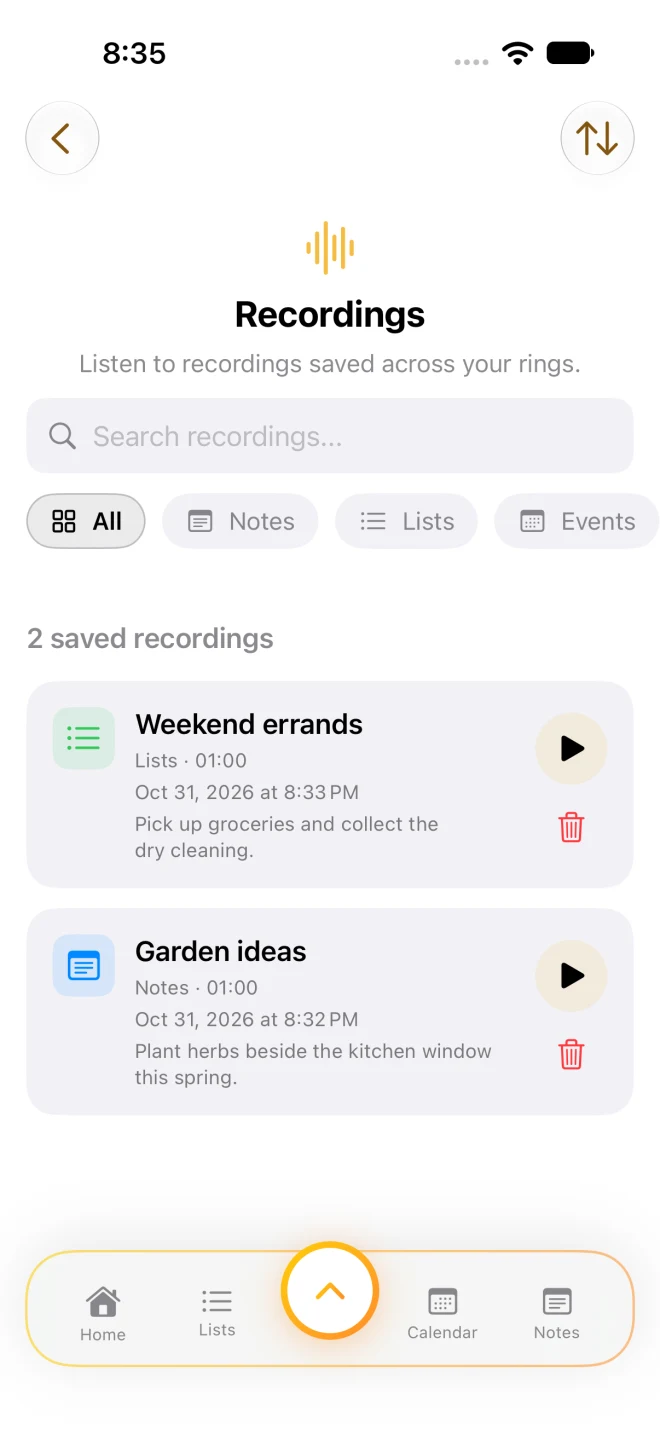
Hear the thought again. Revisit saved audio from your notes, lists, and events in one library. Search transcripts, filter by context, press play, or delete a recording when you are done. Your original words are easy to return to.

After you’ve spokenFind the saved recording. Press play. Pick up the thought.

Voice playback · Searchable transcripts · Delete controls

Lists

Turn spoken thoughts into to-dos. Say the errands, shopping items, or tasks on your mind. 8Rings extracts list items from your recording so you can review them, set priorities, organize personal and work lists, and check things off.

Try saying“Pick up groceries and collect the dry cleaning”

Spoken to-dos · Shopping lists · Priorities

Choose Lists, Calendar, or Notes to capture by voice. Use the command microphone in Timers and Habits, or spoken weight entry in Pounds. Today brings your plans together; Recordings lets you revisit saved audio. Review recognized details and commands before relying on them.

Built around your voice

Speak naturally.
Keep the thought.

Choose Lists, Calendar, or Notes and start a recording. Say what’s on your mind; 8Rings transcribes your words and turns them into useful notes, tasks, or events. Review the result and keep moving.

For example, with Lists selected

“Pick up groceries and collect the dry cleaning.”
Speak naturally Review your list Get on with your day

Saved audio lives in Recordings. Play, search, and delete it there. Deleting audio leaves the notes, lists, or events already created from it in place.

The 8Rings Recordings library showing saved list and note recordings, with play and delete controls
Your saved voice captures, together.
Example recordings shown.
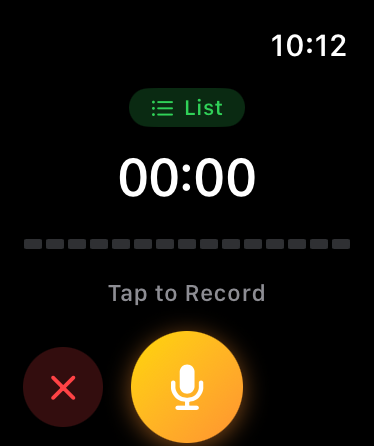
8Rings on Apple Watch, ready to record a list with the gold microphone button
List capture in the 8Rings Watch app.
8Rings on Apple Watch

Your voice.
Right on your wrist.

A thought doesn’t have to wait for your phone. Speak an event, a list, or a note into your Apple Watch. Your paired iPhone brings the recording into 8Rings for processing.

  • Choose a context. Start speaking.

    Dedicated Event, List, and Note capture keeps the Watch experience focused and easy to reach.

  • A shortcut on your watch face.

    Add an 8Rings complication for quick access when a thought comes to you.

Set up your Watch

Requires a paired iPhone. iOS 26 and watchOS 26 or later.

Your content stays close.

Recordings, lists, notes, routines, and weight entries are stored on your device. No separate 8Rings account is needed.

Intelligence on your device.

AI summaries use Apple’s on-device models when available. Supported hardware, language, and Apple Intelligence settings apply.

8Rings app icon

8RingsVoice planner, habits and weight tracker for iPhone.

Start with
your voice.

Speak the plan. Capture the idea. Check in with yourself. Give your voice a place in your everyday routine.

Available now on the App Store as 8Rings. Requires iOS 26 or later, and watchOS 26 or later for the Apple Watch app.

Free trial
30days to find your rhythm.

Try the whole experience.

New users get a 30-day trial starting on first launch. Continue with a monthly or annual subscription for access across the app, including Pounds, Timers, and Habits.

How the trial works

The trial itself does not charge you. A subscription starts only after you confirm an App Store purchase, and then renews automatically unless canceled. Local prices and purchase terms are shown in the app.

A few useful details

Before you settle in.

What can I do with my voice?
Capture events in Calendar, to-dos in Lists, and ideas or journal entries in Notes. Dictate commands in Timers and Habits, and say your weight in Pounds. Today brings your plans together and offers a shortcut to record a journal note; Recordings holds saved audio for playback. On Apple Watch, speak an event, a list, or a note. Start recording or dictation in the feature you want to use, and review the result. Voice recognition and AI features depend on your device and language.
Is this the same app as HeyRings?

Yes. 8Rings is the new name for HeyRings, also referred to as EightRings Pro during development. It continues as an update to the same app. Version 1.03 adds the glass selector and dedicated Today, Pounds, Timers, and Habits experiences.

Do I need to download the separate apps?

No. The eight destinations described here are built into the unified 8Rings app. Existing standalone editions remain separate products; their purchases and saved data do not automatically move into 8Rings. Find help for an earlier standalone app.

Which features work on Apple Watch?

The Watch companion captures events, lists, and notes and transfers recordings to the paired iPhone. You can also check in on the habits you set up on iPhone. A watch-face complication provides quick access. Planning, weight history, timers, and creating or editing habits are part of the iPhone experience.

Does everything work offline?

Your saved content is stored locally and can be viewed on your device. Recording can happen without a network connection. Transcription availability depends on your device and language, and may require Apple services. AI summaries require compatible hardware and available Apple Intelligence models. Purchases need access to the App Store.

Is Pounds included in the same subscription?

Yes. Pounds is a dedicated screen within the unified 8Rings app and uses the same trial and subscription. It does not require the separate standalone Pounds lifetime purchase.

Can I get the new version from the App Store now?

Yes. 8Rings 1.03 is live on the App Store as a free download for iPhone with iOS 26 or later. It includes everything described on this site, plus the Apple Watch app for watchOS 26 or later.

More answers in support